A school principal needs data to make good decisions. How many students are absent this week? Which class has the most pending fees? Which subject has the lowest exam results? Without a proper reporting system, getting answers to these questions means going through registers and spreadsheets for hours.
EDS Reports and Analytics pulls live data from every module and turns it into clear, printable reports in seconds. No manual data collection, no calculations, no waiting.
A school reports and analytics system is software that collects data from all school departments and presents it as organized reports. It covers student data, attendance summaries, fee collection figures, exam results and financial statements. In EDS, all reports are generated automatically from live data — no manual compilation is needed at any point.
Every action in EDS creates a data record. When attendance is marked, fee is collected or a salary is processed, the data goes into the system. The reports module reads this data and turns it into reports whenever you need them. Select the report type, choose the date range or class and the report is ready. Most reports take under 10 seconds to generate.
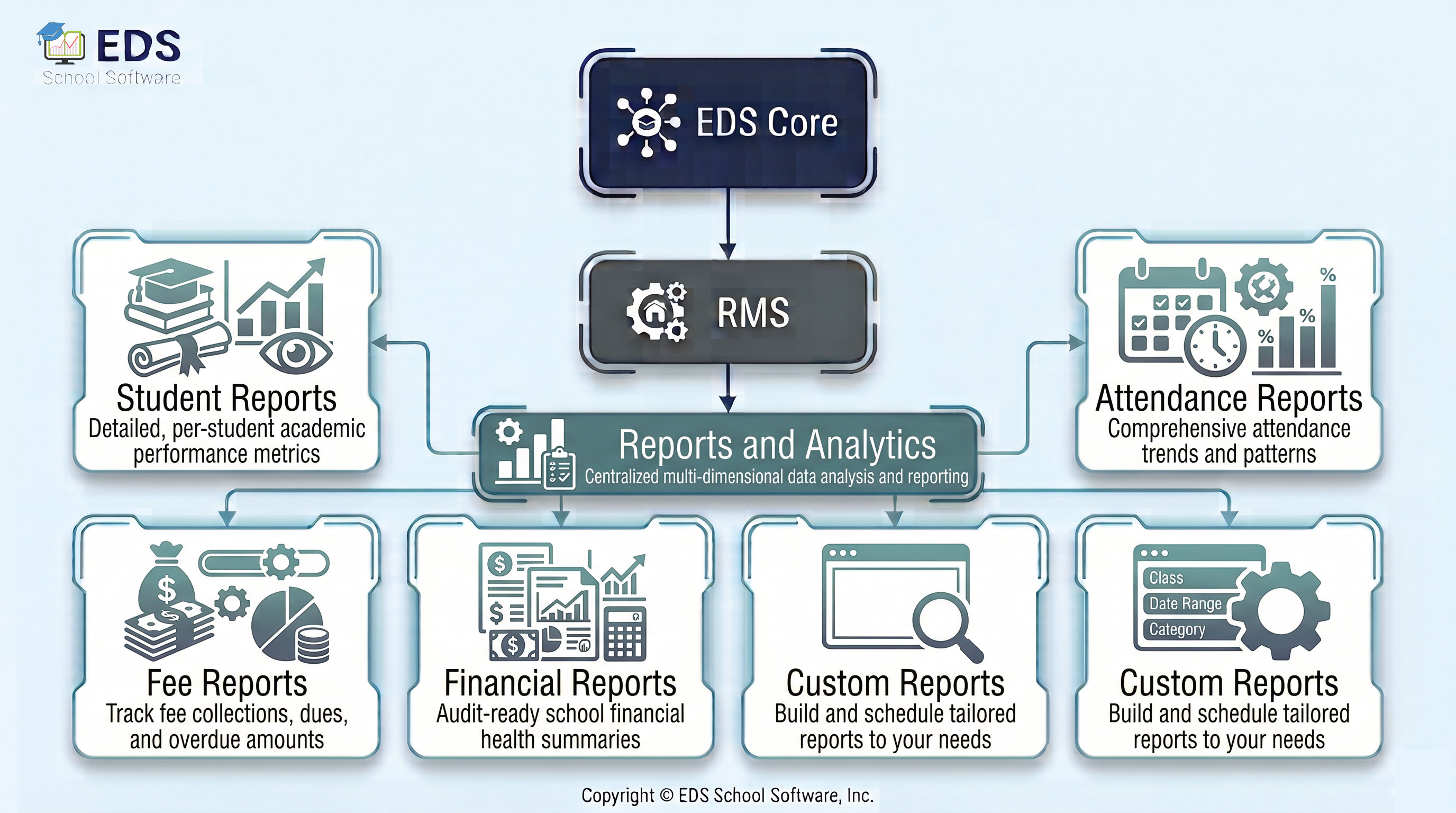
EDS Reports and Analytics covers 5 report categories. Each covers a specific area of school management.
Class-wise student lists, strength reports and enrollment summaries.
📋 Attendance ReportsDaily, weekly and monthly attendance summaries for students and staff.
💰 Fee ReportsMonthly fee collection, pending dues and class-wise fee summaries.
📊 Financial ReportsIncome, expense, profit and loss and balance sheet reports.
🛠️ Custom ReportsBuild custom reports by combining filters, date ranges and data fields.
The EDS dashboard gives principals a live overview every morning without asking any staff member for updates:
All attendance data feeds into attendance reports automatically.
💰 Fee ManagementFee collection and due data generates fee reports in real time.
📊 Accounts ManagementIncome and expense data generates financial reports automatically.
Stop collecting data manually. EDS generates every report you need from live data instantly. Free trial available — no credit card, no installation required.
Get Started Free View PricingQuestions? WhatsApp: +92-318-5141503
Common questions about EDS School Reports and Analytics — attendance reports, fee summaries, financial statements and custom reports for Pakistani schools.
EDS generates over 30 types of reports including student enrollment, attendance summaries, fee collection and dues, exam results, staff attendance, payroll summaries, income and expense statements and balance sheets. All reports pull live data from the system automatically.
Yes. Every report in EDS can be filtered by class, section, student, date range or academic session. Select the filters you need and the report updates instantly to show only the relevant data.
Yes. All EDS reports are print-ready. Click print from the report screen and the report comes out formatted correctly on paper. No extra formatting or copy-paste to Word or Excel is needed.
Yes. EDS reports always show the latest data. When attendance is marked, fees are collected or expenses are entered, the reports reflect this immediately. There is no need to refresh or update reports manually.
Yes. EDS Custom Reports lets you combine multiple filters and data fields to build the exact report you need. If a standard report does not cover your specific requirement, the custom report builder gives you full control over what data to include.
Our support team is ready to help you set up reports and analytics for your school, in Urdu or English.
Contact Support Schedule Free Demo